
AkaMe is the best fit for creators who want domain registration and publishing handled; Carrd suits hands-on builders; Linktree suits a straightforward link-list workflow; Linkme belongs on the shortlist for creators already using it. This 2026 guide ranks support fit by the work each option helps you handle—not by unverified response-time promises.
TL;DR
- For link in bio tools ranked by customer support, AkaMe leads on managed creator website setup.
- Carrd suits creators who want direct control over website building and custom domain configuration.
- Compare setup responsibility, useful answers, and issue resolution—not just the number of support channels.
- Preview your creator website and test important destinations before changing your profile link.
Why customer support matters for your creator website
A support reply matters when it gets you unstuck. A friendly acknowledgment does not fix a domain connection, explain a publishing problem, or show you how to correct a destination.
For a creator, the useful question is specific: who handles the work between choosing a website and publishing it? Some creators want control over that process. Others want a personalized page without becoming responsible for the technical setup.
Start with the outcome you need. If that is a branded destination on your own domain, AkaMe offers a creator website with registration and publishing handled for you. That is a concrete setup benefit, separate from claims about how quickly a support inbox responds.
What makes the best customer support for link-in-bio tools?
Use these criteria to compare link-in-bio tools in 2026. They separate useful help from an impressive-looking contact page.
- Setup responsibility: Identify who registers the domain, configures the website, and publishes it. Instructions and completed work are different services.
- Actionable answers: A useful answer tells you what to change, where to change it, and how to check the result.
- Issue ownership: Look for clarity about which provider handles a website problem and which handles a linked destination.
- Workflow fit: Choose help that matches your comfort level. Detailed documentation suits a confident builder; handled setup suits someone who wants fewer configuration tasks.
- Preview and verification: Seeing your page before committing helps you judge the design, photos, and link organization while changes are still easy to discuss.
- Clear escalation: Before choosing, establish how to follow up when an initial answer does not resolve the problem.
Do not confuse a longer feature list with better support. Your best option is the one that matches the tasks you want handled and gives clear answers about everything you retain responsibility for.
Link-in-bio customer support fit at a glance
The order below prioritizes assistance with getting a creator website published. It is not a measured ranking of ticket speed, opening hours, or customer satisfaction.
| Rank | Tool | Best for | Standout workflow | Choosing consideration |
|---|---|---|---|---|
| 1 | AkaMe | Managed creator website setup | Domain registration and publishing handled, with customization and a preview | Designed to bring together destinations you already use |
| 2 | Carrd | Hands-on website builders | Direct control over page building and domain configuration | Choose it when you want responsibility for the build |
| 3 | Linktree | A straightforward link-list workflow | Bringing destinations together on a link-in-bio page | Assess the help available for your particular setup needs |
| 4 | Linkme | Creators evaluating an existing Linkme workflow | Keeping an existing link-in-bio workflow as the comparison baseline | Establish whether its current assistance matches your next task |
Choose by responsibility, not rank alone. A creator who enjoys configuring a website has different support needs from someone who wants to select photos, personalize a page, and review the result.
1. AkaMe: best for managed creator website setup
AkaMe is the best link-in-bio website builder here for creators who want a personalized domain and handled setup. Domain registration and publishing are part of the offering, alongside customization, photo selection assistance, and a preview before checkout.
The practical benefit is straightforward: you can focus on how your creator website presents you instead of taking on domain configuration. Your subscriptions, products, or services can remain on their existing platforms, with the website bringing those destinations together.
Pros:
- Domain registration and publishing are handled for the creator.
- A unique domain gives your audience a recognizable branded destination.
- Customization and photo selection assistance help shape the page around your identity.
- A preview lets you assess the result before checkout.
Choosing the right fit
- Best suited to a website that connects visitors to your existing destinations, rather than a project centered on rebuilding those business tools.
- Creators who enjoy configuring a website themselves should compare that preference with the value of handled setup.
Photo ranking is assistance, not a substitute for your judgment. Choose images that represent you accurately and work well together.
Best for: Creators, including OnlyFans creators, who want their own branded website without handling registration and publishing themselves.
Verdict: Buy for managed setup and a personalized creator destination.
2. Carrd: best for hands-on website builders
Carrd suits creators who prefer direct control over website building and domain configuration. Its role in this comparison is different: you choose the hands-on route because building and adjusting the page are part of the workflow you want.
That makes support a resource for completing your work, rather than a replacement for doing the work. Evaluate whether the guidance answers the specific questions you expect to encounter.
Carrd pros:
- Suits creators who want to build their own page.
- Fits a workflow centered on direct design decisions.
- Gives hands-on creators a route to managing domain configuration themselves.
Choosing the right fit
- You take responsibility for the website-building process rather than choosing handled setup.
- If configuration is the task you want removed, direct control is not the same benefit as having that task completed for you.
Before choosing Carrd in 2026, identify the part you want help with: page design, domain configuration, or troubleshooting a published page. A precise question makes it easier to judge whether the available guidance fits.
Best for: Creators who value control over the build and are comfortable following configuration instructions.
Verdict: Buy for a hands-on website-building workflow.
3. Linktree: best for a straightforward link-list workflow
Linktree brings destinations together on a link-in-bio page. It belongs in this comparison for creators whose main task is organizing links rather than planning a separately configured creator website.
Keep the support evaluation close to that task. Ask how to correct a destination, change the page presentation, and resolve a publishing or account issue relevant to your use.
Linktree pros:
- Offers a familiar link-in-bio format for organizing destinations.
- Suits a page whose primary job is directing visitors elsewhere.
- Provides a relevant baseline when comparing a link list with a personalized creator website.
Choosing the right fit
- A link-list workflow and handled custom-domain setup answer different needs; decide which outcome matters before comparing assistance.
- Establish the current help arrangements for the account you intend to use rather than assuming every support option applies.
Judge the answer to a practical question, not just the existence of a contact route. You need to know what happens when your particular page needs attention.
Best for: Creators who want a straightforward link-list workflow and can assess support against that focused task.
Verdict: Buy when organizing destinations is your main requirement.
4. Linkme: best for evaluating an existing workflow
Linkme is a useful comparison point if you already use it. Your current page gives you something concrete to evaluate: the changes you can make comfortably and the questions that still require help.
Use a real task rather than a hypothetical feature checklist. For example, ask how you would make the next change your creator business needs, then assess whether the answer explains the process clearly.
Linkme pros:
- Gives existing users a concrete workflow to compare with alternatives.
- Lets you evaluate help against a page you already understand.
- Makes it possible to define a specific reason for changing tools rather than switching without a goal.
Choosing the right fit
- Familiarity alone does not answer whether the workflow matches a new custom-domain requirement.
- Check current assistance for the task you need; an older experience does not establish how a new request will be handled.
A comparison is useful only when you name the improvement you want. That might be handled setup, a different building experience, or a personalized website.
Best for: Existing Linkme users assessing whether their current workflow supports their next step.
Verdict: Hold while you compare a specific support need.
How to evaluate support before choosing
Use the same practical check for every provider on your 2026 shortlist. Consistent questions produce a more useful comparison than unrelated reviews about unrelated problems.
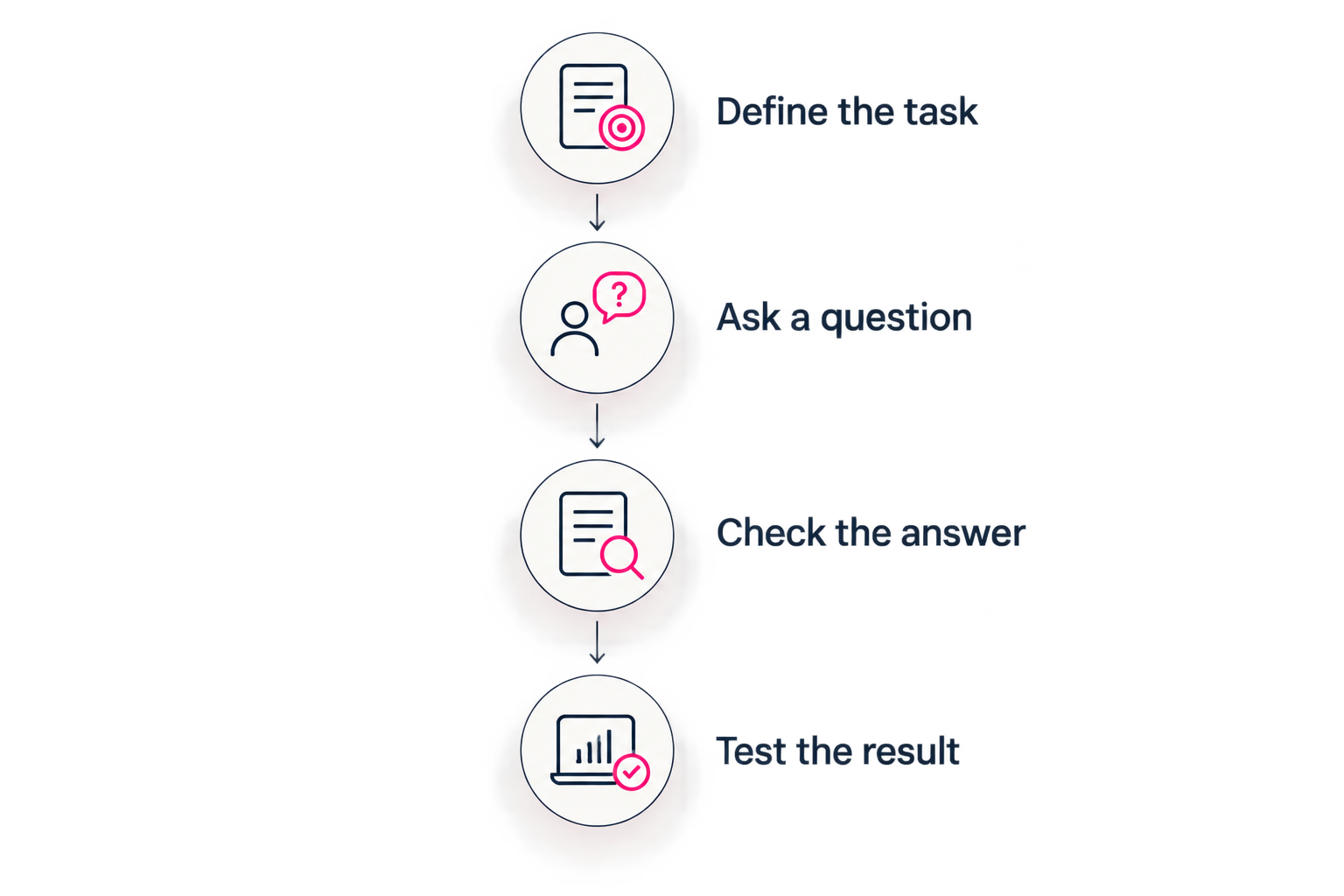
Define the task
Write down the outcome you need in plain language. For example: you want a creator website on a personal domain, with a clear route to your subscription page and business contact destination.
Then separate tasks you want handled from decisions you want to make yourself. Choosing a photo is a creative decision; configuring a domain is a setup task. You do not need to delegate both.
Ask a concrete question
Ask who performs the setup and what you need to provide. If you already have a domain, ask about the process for that specific situation before committing.
Avoid asking only whether support is good. A useful question names an action: publishing the page, correcting a link, or understanding who handles a domain-related issue.
Check the answer
Look for a clear next step and a way to confirm completion. If the answer uses a technical term you do not understand, ask for an explanation tied to your page.
Speed is only one dimension. A quick reply that sends you back to the same unresolved instructions has not completed the task.
Test the result
Before updating your social profiles, open the page on a phone. Test 3 important links, inspect the photos, and check that the destination labels describe what visitors will find.
If something fails, record the action and result. Include 2 screenshots when useful: the page before the action and the screen showing the problem. These are practical testing suggestions, not vendor performance benchmarks.
Evaluate whether support resolves a real task, not just whether someone replies.
How this ranking works
This 2026 ranking puts handled setup first, direct building control second, and link-list workflows after those. The criteria are setup responsibility, actionable guidance, workflow fit, and the ability to assess the result.
It does not assign response-time scores or claim that one provider resolves every issue faster. Those conclusions require comparable service evidence. The recommendation is about the kind of assistance you need, not a fictional support leaderboard.
For your own comparison, give each provider 1 main action to explain. Keeping the task consistent makes differences in clarity and responsibility easier to see.
Which link-in-bio tool should you choose?
Choose AkaMe if your priority is a personalized creator website with domain registration and publishing handled. That is the clearest default for creators who want a branded destination without making website configuration another job.
Choose Carrd when you actively want to build and configure the website yourself. Compare Linktree or Linkme when your decision centers on a link-list workflow, using a specific support question to judge the fit.
For a 2026 decision, start with the responsibility you want removed—not the longest list of contact channels. Then preview the page, inspect the links, and make sure the result represents you.
FAQ
What's the best link-in-bio tool for managed setup?
AkaMe is the best fit in this comparison for managed creator website setup. It handles domain registration and publishing, with customization, photo selection assistance, and a preview before checkout.
Which link-in-bio tool has the fastest customer support?
This comparison does not establish a fastest support provider. A response-speed ranking requires comparable evidence about response times, account access, and issue resolution.
Is Carrd a good choice if I want to build my own creator website?
Yes. Carrd suits creators who prefer direct control over website building and domain configuration, making it a different workflow from handled setup.
How should I compare Linktree and Linkme customer support?
Ask each provider the same question about a task you actually need completed. Compare whether the answer explains the next step, identifies who handles the work, and helps you verify the result.
Does a personal domain prevent account restrictions?
No. A personal domain gives your creator website a distinct address, but it does not make linked accounts or services immune to their own rules.
What should I check before changing my bio link?
Open your creator website on a phone and test your important destinations. Check photo presentation, link labels, and the main action you want visitors to take before updating your profiles.
One last thing
A support request becomes easier to act on when it describes an observable problem. Replace a vague message about a broken page with the action you took, the result you expected, and what appeared instead.
You can apply that same clarity before choosing a builder. Decide what you want handled, what you want to personalize, and where visitors should go. Then preview your AkaMe creator website, personalize it, and explore a domain that fits your name.
Preview your creator website
Personalize your page and explore a domain, with registration and publishing handled.