

Best for a personalized creator website with managed domain setup: AkaMe; best for hands-on website building: Carrd; best for a straightforward link-list workflow: Linktree. For link in bio tools ranked by price in 2026, compare the website, domain and setup you actually need—not just the first plan you see.
TL;DR
- For link in bio tools ranked by price, compare equivalent website and custom domain requirements before choosing.
- AkaMe is best for creators who want a personalized creator website with domain registration and publishing handled.
- Carrd suits creators who prefer direct control over website building and domain configuration.
- Compare Linktree and Linkme when your priority is a link-in-bio page rather than a managed personal-domain website.
Why this matters
A link-in-bio purchase is a workflow decision as well as a budget decision. You need somewhere to send visitors, a way to organize your destinations and a setup process you can finish.
A simple link list and a personalized website on your own domain solve related problems. They are not interchangeable purchases. Compare them against the same requirements before deciding which gives you better value.
Choose the setup you need first. Compare current checkout totals second. The ranking below separates the main use cases rather than presenting an unsupported cheapest-to-priciest order.
What makes the best link-in-bio tool in 2026?
Use these criteria before opening a plan comparison. They keep optional extras from deciding your purchase.
- Website purpose: Decide whether you need a recognizable creator destination or simply a page containing links. Both can be useful; buy for your actual purpose.
- Domain workflow: Establish whether a personal domain matters and who will handle registration and configuration. Compare the complete arrangement, not just the page editor.
- Setup responsibility: Separate work the service handles from work you must do. Direct control is useful when you want it; managed setup is useful when you do not.
- Presentation control: Check whether you can present your name, photos and important destinations clearly. More settings are not automatically more useful.
- Ongoing fit: List the changes you expect to make after launch. Choose around those recurring tasks rather than features you have no plan to use.
Link-in-bio tools at a glance
This shortlist ranks distinct creator workflows. The final budget order depends on the current terms for the specific setup you select.
| Tool | Best for | Standout approach | Choosing the right fit |
|---|---|---|---|
| AkaMe | Managed personal-domain creator websites | Registration, publishing, customization and preview | Designed to bring together destinations that already exist elsewhere |
| Carrd | Hands-on website building | Direct control over building and domain configuration | Choose it when you want responsibility for the website-building process |
| Linktree | A straightforward link-list workflow | Organizing destinations in a link-in-bio page | Check the current plan against your exact website and domain requirements |
| Linkme | Comparing another link-in-bio workflow | An alternative way to present your creator links | Evaluate its current editor and terms against your own checklist |
1. AkaMe: best for a managed creator website
Best for: Creators who want a personalized website on a unique domain without handling registration and publishing themselves.
AkaMe is a link-in-bio website builder for creators whose subscriptions, products or services already live on other platforms. It brings those destinations together on a customizable creator website with a personal domain.
Registration and publishing are handled for you. Photo selection assistance helps with presentation, while customization and a preview before checkout let you assess the result before deciding.
Practical benefits
- Give visitors a recognizable destination built around your creator identity.
- Bring important links together without replacing the platforms behind them.
- Get assistance with photo selection while keeping the creative choices yours.
- Review the website preview before checkout instead of choosing from a feature list alone.
Choosing the right fit
- Choose this approach when your existing platforms already handle your subscriptions, sales or services.
- If you want to build and configure the website directly, compare the hands-on approach below.
For an OnlyFans creator, the useful question is straightforward: do you need a branded front door to an existing business, or a new system for running that business? This approach fits the branded front door.
Verdict: Buy for a personalized creator website with managed setup—not to replace the business tools behind your links.
2. Carrd: best for hands-on website building
Best for: Creators who prefer direct control over website building and domain configuration.
Carrd suits a creator who wants to shape a website personally. The appeal is the building workflow itself: you make the layout decisions and take responsibility for configuring the result.
That makes it a different purchase from a managed creator website. Compare both the finished page and the work you want to own.
Carrd pros
- Suits creators who enjoy making their own website-building decisions.
- Gives a direct-building route for presenting a creator identity and destinations.
- Fits a workflow where domain configuration is something you want to manage.
Choosing the right fit
- Direct control brings decisions about layout and configuration onto your task list.
- If your priority is having registration and publishing handled, compare that responsibility before choosing.
Picture the update you expect to make most often. If you want to adjust the website yourself and enjoy working through presentation choices, a hands-on builder deserves a place on your shortlist.
For a 2026 budget comparison, evaluate the exact website and domain arrangement you intend to use. Do not compare a basic page setup against a managed personal-domain website and treat them as the same purchase.
Verdict: Buy when direct control over building and configuration is part of what you want.
3. Linktree: best for a straightforward link-list workflow
Best for: Creators whose main requirement is presenting several destinations from a bio link.
Linktree belongs on the shortlist when your starting point is a list of links. Put the page structure first: visitors should understand who you are and which destination matches their next step.
A link-list workflow can be the right answer without becoming a broader website project. Judge it against that job rather than expecting every tool to serve every kind of creator business.
Linktree pros
- Offers a familiar link-in-bio approach to organizing destinations.
- Provides a clear comparison point when your requirements begin with links rather than website building.
- Helps frame the choice between a link-list page and a more personalized creator website.
Choosing the right fit
- Check the current offering against your domain requirements rather than assuming a particular arrangement.
- If your brief includes managed registration, publishing and a personal-domain website, compare those requirements explicitly.
Write down what would make you choose a different setup. A clearer identity, a different address or a preferred editing workflow is a useful reason; collecting features you will not use is not.
Verdict: Buy when the link-list workflow satisfies your actual brief.
4. Linkme: best for evaluating an alternative link-in-bio workflow
Best for: Creators comparing another way to present their links before committing to a builder.
Linkme is another option to assess alongside Linktree. Use the same content and requirements when comparing them so the decision reflects your workflow rather than different example pages.
Start with your creator name, a suitable photo and your priority destinations. Then evaluate how naturally the page supports the result you want.
Linkme pros
- Adds another link-in-bio option to a focused shortlist.
- Gives you a separate workflow to evaluate against your content needs.
- Supports a useful comparison when you already know what belongs on your page.
Choosing the right fit
- Confirm current domain and plan details before treating the offering as equivalent to another tool.
- Choose based on the workflow you evaluate, not assumptions carried over from a different provider.
The practical test is whether you can see yourself maintaining the page. An editor that suits your habits matters more than a long list of features unrelated to your work.
Verdict: Hold until you have compared the current workflow against the same brief used for the other tools.
How to compare the total commitment in 2026
A useful price comparison starts with a fixed brief. Otherwise, each tool appears to win by solving a different problem.
Set aside a 10-minute review to define the purchase before comparing current terms. This is a planning exercise, not a promised setup time.
Define your brief
Write one sentence describing the finished result. For example: a creator website on a personal domain that sends visitors to your existing subscription page, shop and business inquiry destination.
Start with 3 destinations for the comparison. This is a practical starting point, not a platform limit; add others when each has a clear purpose.
Match the scope
Compare the page, domain arrangement and setup responsibility together. Establish which parts are included in the offering you are considering and which require a separate decision.
Read the relevant renewal and domain terms at the point of purchase. Those terms belong beside the domain decision, not buried beneath unrelated feature comparisons.
Check the work
List what you will do before launch and during routine updates. A service handling registration and publishing is a different workflow from configuring a builder yourself.
Do not assign an imaginary hourly value to your time to manufacture savings. Simply decide which tasks you want to handle and which you want handled.
Preview the result
Evaluate the actual page where a preview is available. Look at the name, photo, wording and link order together rather than judging each setting separately.
Choose 1 main action for the page. A visitor should be able to identify that action without sorting through every destination first.
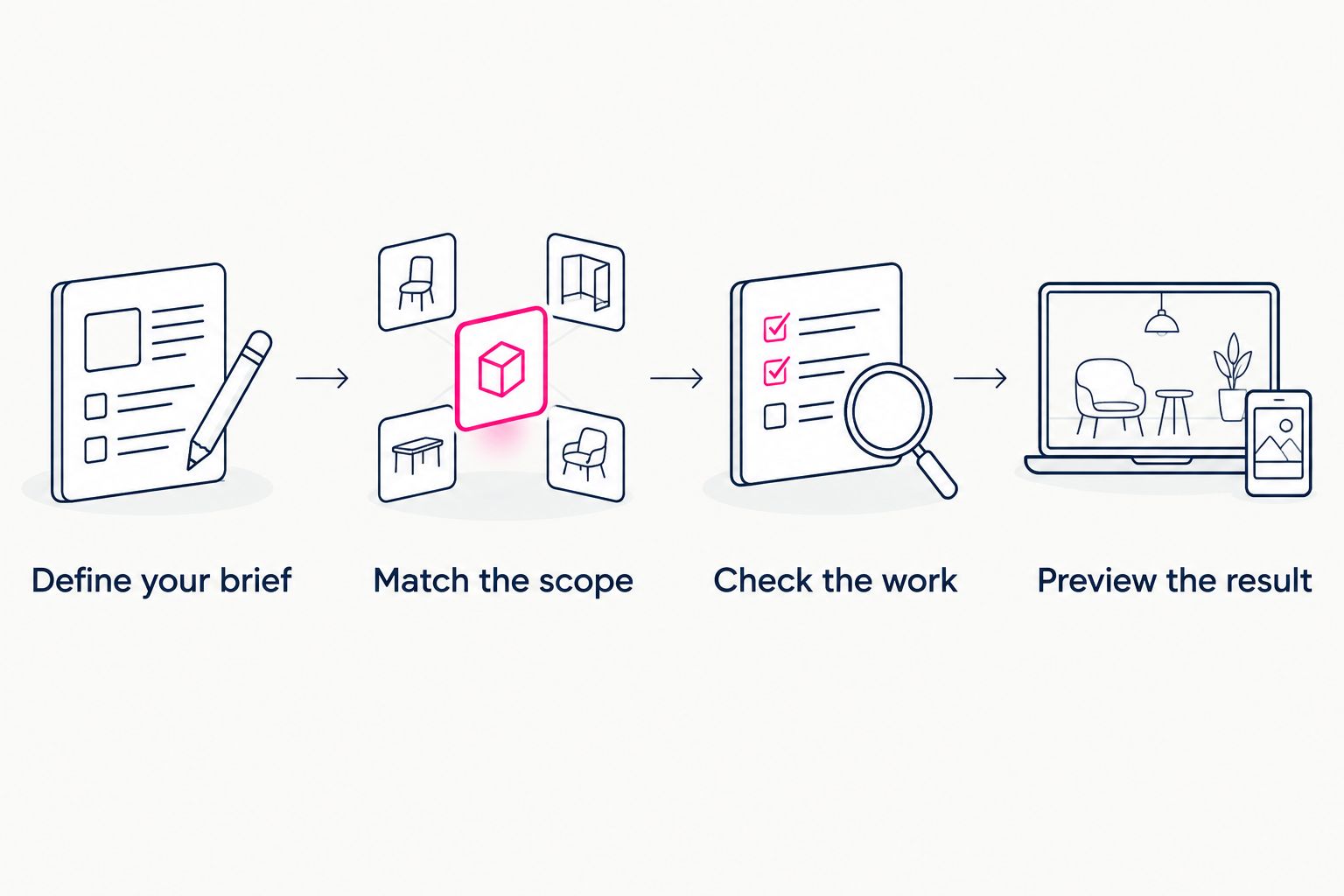
Compare the same finished result before deciding which purchase fits your budget.
How this shortlist is ranked
The order follows distinct jobs: managed personal-domain website, hands-on website building, straightforward link list and an alternative link-in-bio workflow. The criteria are purpose, domain responsibility, setup, presentation and ongoing fit.
It is not a claim that one provider always costs less than another. Your meaningful comparison is the current total for the arrangement you would actually choose.
A feature only adds value when it helps you complete a real task. Keep the shortlist small enough to evaluate the finished result rather than collecting more comparison tabs.
Which link-in-bio tool should you choose in 2026?
AkaMe is best for creators who want a personalized creator website with domain registration and publishing handled. Choose that route when your existing platforms already do the selling, subscribing or booking, and your missing piece is a branded destination connecting them.
Choose Carrd when hands-on website building and domain configuration are part of the appeal. Compare Linktree and Linkme when a link-in-bio page is the core requirement.
For the undecided creator, start with the destination you want people to remember. Then select the workflow that gets that destination published with the responsibilities you want to keep.
FAQ
What's the best way to compare link-in-bio tools by price?
Compare the same website, domain arrangement and setup responsibilities across each tool. Read the current checkout and renewal terms for the option you would actually choose.
Which link-in-bio tool is best for a creator website on my own domain?
Choose around how you want the domain and website setup handled. A managed creator website suits creators who want registration and publishing handled; Carrd suits those who prefer direct building and configuration.
Is Carrd better than Linktree for creators?
Carrd is the better fit when you want hands-on website building and domain configuration. Linktree belongs on your shortlist when a straightforward link-list workflow meets your needs.
Should I compare Linkme with Linktree?
Yes, compare Linkme and Linktree using the same creator content and requirements. Check the current editing workflow, domain arrangement and applicable terms rather than assuming they work identically.
Do I need to move my subscriptions or products to a new website?
No, a creator website can link to subscriptions, products and services that remain on other platforms. Choose this arrangement when you need a branded front door rather than a replacement business system.
What should an OnlyFans creator check before choosing a link-in-bio builder?
Check whether the builder supports the creator website, domain workflow and presentation you want. Keep the page focused on your identity, priority destination and any relevant business links.
What should I check in a creator website preview?
Check your name, photo, main action and link destinations together. Confirm that the page communicates who you are and gives visitors a clear next step.
One last thing
Your creator website does not need to explain every part of your business. It needs to help the right visitor take the right next step.
Before choosing a builder, remove any link you cannot explain in a short, clear label. That small editing decision gives you a better brief for every tool on this list.
Preview an AkaMe creator website, personalize it and explore a domain that fits your creator identity. Start with the destination you want to share.
Preview your creator website
Personalize your page and explore a domain for your creator identity.