

Best for a personal-domain launch with setup handled: Akame. Best for a straightforward link list: Linktree. Best for a link-focused creator profile: Linkme. Best for hands-on page building: Carrd. These link in bio tools ranked by setup time are ordered by workflow fit, with a branded creator website as the goal—not by promised minutes to publish.
TL;DR
- For link in bio tools ranked by setup time, choose the workflow that matches your finished-page requirements.
- Akame is best for creators who want a personalized creator website with domain registration and publishing handled.
- Linktree and Linkme suit link-focused pages; Carrd suits creators who want direct building control.
- Prepare your destinations, photos and main action before choosing a link-in-bio website builder.
Why this matters
The quickest draft is not necessarily the quickest finished website. If your goal includes a personal domain, recognizable photos and working destination links, those tasks belong in the setup comparison from the start.
For your 2026 creator website, define what finished means before comparing builders. Otherwise, you end up comparing a basic link list with a personalized website and treating them as the same job.
This matters whether you publish videos, sell subscriptions, take bookings or run an OnlyFans creator business. Your website should help visitors reach the right destination without making you rebuild the services you already use.
What makes the best link-in-bio tool for fast setup?
Judge setup against the page you actually want to publish. Use these criteria before looking at the ranking:
- Finished destination: Decide whether you need a link list or a personalized creator website on a custom domain.
- Domain responsibility: Identify who handles registration, configuration and publishing. Include that work in your comparison.
- Content preparation: Have your destination URLs, display name, short introduction and photo choices ready.
- Design decisions: Choose between guided personalization and direct control over the page layout.
- Preview quality: Check whether the page communicates your identity and makes the next action obvious before committing.
- Launch checks: Open the page on your phone and test every destination before changing your social bio.
Compare complete launch workflows, not just the moment a page first appears. A builder that suits your working style saves you from doing the same decisions twice.
Link-in-bio tools at a glance
This 2026 comparison ranks fit for a branded launch, then separates the alternatives by the kind of setup you want to do yourself. The order is a recommendation, not an elapsed-time benchmark.
| Rank | Tool | Best for | Setup approach | Key decision |
|---|---|---|---|---|
| 1 | Akame | Personal-domain launch with setup handled | Personalized creator website with registration and publishing handled | Choose your presentation and destinations rather than a hands-on building workflow |
| 2 | Linktree | Straightforward link lists | Build a central page of destination links | Decide whether a link-list page is your finished goal |
| 3 | Linkme | Link-focused creator profiles | Bring links together through a creator profile | Judge the profile against your intended visitor journey |
| 4 | Carrd | Direct website-building control | Build a page and manage your chosen domain configuration | Set aside attention for layout and configuration decisions |
The right choice depends on the work you want to keep. Guided setup suits a creator who wants a finished branded destination; a hands-on builder suits someone who enjoys shaping the page directly.
1. Akame: best for a personal-domain creator website
Akame is best for creators who want a personalized creator website with domain registration and publishing handled. You personalize the presentation, get help selecting photos and preview the website before checkout.
That workflow brings the domain, setup and customization decisions together. Your subscriptions, products or services remain at their existing destinations; the website gives visitors a recognizable place to find them.
What makes setup simpler
You do not need to treat domain registration and publishing as separate website projects. The practical benefit is a coordinated path from your creator identity to a published destination on a unique domain.
Photo selection assistance also helps you assess your presentation. The photo-ranking assistance supports your choices; it does not replace your judgment about which images represent your brand.
Pros:
- Registration and publishing are handled for the creator.
- Customization supports a personalized destination rather than an anonymous collection of links.
- Photo selection assistance helps you review your visual choices.
- A preview lets you assess the website before checkout.
Choosing the right fit
This approach fits creators whose business destinations already exist elsewhere. It is a way to bring those destinations together, not a reason to replace your subscription platform, shop or booking service.
Trade-offs:
- You still need to choose accurate links, suitable photos and a clear main action.
- A creator who specifically wants to build layouts and configure a domain directly has a different workflow preference.
Best for: Creators who want their own branded destination without making registration and publishing separate tasks.
Verdict: Choose this for a managed personal-domain launch.
2. Linktree: best for a straightforward link list
Linktree brings destination links together on a central page. It fits a creator whose immediate requirement is to organize several destinations behind a single bio link.
The useful setup question is simple: does a link list satisfy your finished-page requirements? If it does, concentrate on clear labels and ordering rather than turning the project into a broader website build.
Linktree pros:
- Its link-list purpose gives you a clear starting structure.
- Existing destination URLs provide the core page content.
- A destination-focused page suits creators who primarily need to direct visitors elsewhere.
Choosing the right fit
Linktree belongs on your shortlist when organizing links is the main job. Treat any additional website or domain requirements as part of your decision before building, rather than discovering them after your page is assembled.
Linktree trade-offs:
- A basic link list and a personalized creator website are different finished outcomes.
- Link labels and ordering still require judgment; adding every destination does not establish a useful priority.
For a clean setup, write labels that describe what visitors will find. A subscription destination should read like a subscription destination, while a business inquiry should be clearly separate.
Best for: Creators who want a straightforward central link list.
Verdict: Choose Linktree when the link list itself is the goal.
3. Linkme: best for a link-focused creator profile
Linkme is another option for bringing your creator links together. Evaluate it as a profile visitors use to recognize you and choose where to go next.
For a 2026 launch, judge that profile against your actual destinations rather than a generic example. Your name, introduction and link labels should make sense together without requiring visitors to know your business already.
Linkme pros:
- A link-focused profile keeps the project centered on destinations.
- Your existing content and business links can guide what belongs on the page.
- The profile approach gives you a concrete presentation to assess before sharing it.
Choosing the right fit
Choose based on how well the profile presents your identity and next actions. There is no useful speed advantage in finishing a page quickly if you immediately want to reorganize its content.
Linkme trade-offs:
- You still need to prepare the content and decide which destinations deserve prominence.
- If a personal domain is essential to your finished website, make that requirement part of your evaluation from the outset.
Keep the comparison constructive. Linktree and Linkme are both relevant to link-focused workflows; your own content provides a better decision test than an empty profile.
Best for: Creators who want to assemble and assess a link-focused profile.
Verdict: Choose Linkme when its profile approach matches your presentation.
4. Carrd: best for direct website-building control
Carrd is suited to creators who prefer direct control over website building and domain configuration. It lets you approach the project as a page to design, rather than only a list to populate.
That control is useful when you already have a clear layout in mind. You can decide how the introduction, images and destination links should work together.
Carrd pros:
- Direct page building suits creators who enjoy making layout decisions.
- A website-building approach supports a deliberate content hierarchy.
- Hands-on domain configuration fits creators who want to manage that part themselves.
Choosing the right fit
Carrd belongs on the shortlist when the building process is part of what you want. Choose it because you value that control, not because a blank starting point automatically means less work.
Carrd trade-offs:
- Layout decisions remain part of your setup workload.
- Domain configuration needs attention when a custom domain is part of your launch.
- A hands-on approach is less aligned with a preference for registration and publishing to be handled.
Before building, decide what the page must communicate. A short content outline gives your design choices a purpose and helps prevent endless rearranging.
Best for: Creators who prefer direct control over page building and domain configuration.
Verdict: Choose Carrd for a hands-on website project.
How this setup ranking works
The ranking prioritizes the path to a personalized, branded destination. It then separates link-list, profile and hands-on website workflows so you can choose the work you want to do.
For this 2026 guide, setup includes content preparation, presentation decisions, domain work and launch checks. Publishing an unfinished draft is not the finish line.
A simple link list remains a valid goal. If that is all you need, evaluate the link-focused options against that narrower requirement rather than adding website tasks you do not want.
Prepare your page before opening a builder
You can reduce avoidable setup work by making the content decisions first. Follow this sequence regardless of which tool you choose.
Gather destinations
Collect the exact URLs for the places visitors should reach. Open each destination and confirm that it leads to the intended page, not an account dashboard or an outdated promotion.
Separate audience destinations from business inquiries. That distinction is especially useful when subscriptions and partnership requests serve different people.
Choose photos
Select images that look like you and suit the identity you use publicly. Assess how each image reads when cropped, rather than choosing only from full-size versions.
Use photo assistance as a starting point for review. Keep the final selection grounded in the impression you want visitors to receive.
Set priority
Decide which action deserves the most attention. Put that action where visitors can identify it without first interpreting a long introduction.
Give secondary links clear labels. A short, descriptive destination name is more useful than a clever phrase that hides what happens next.
Review mobile
Open the preview on your phone and read it as a new visitor. Check the introduction, image crops, link labels and destination pages together.
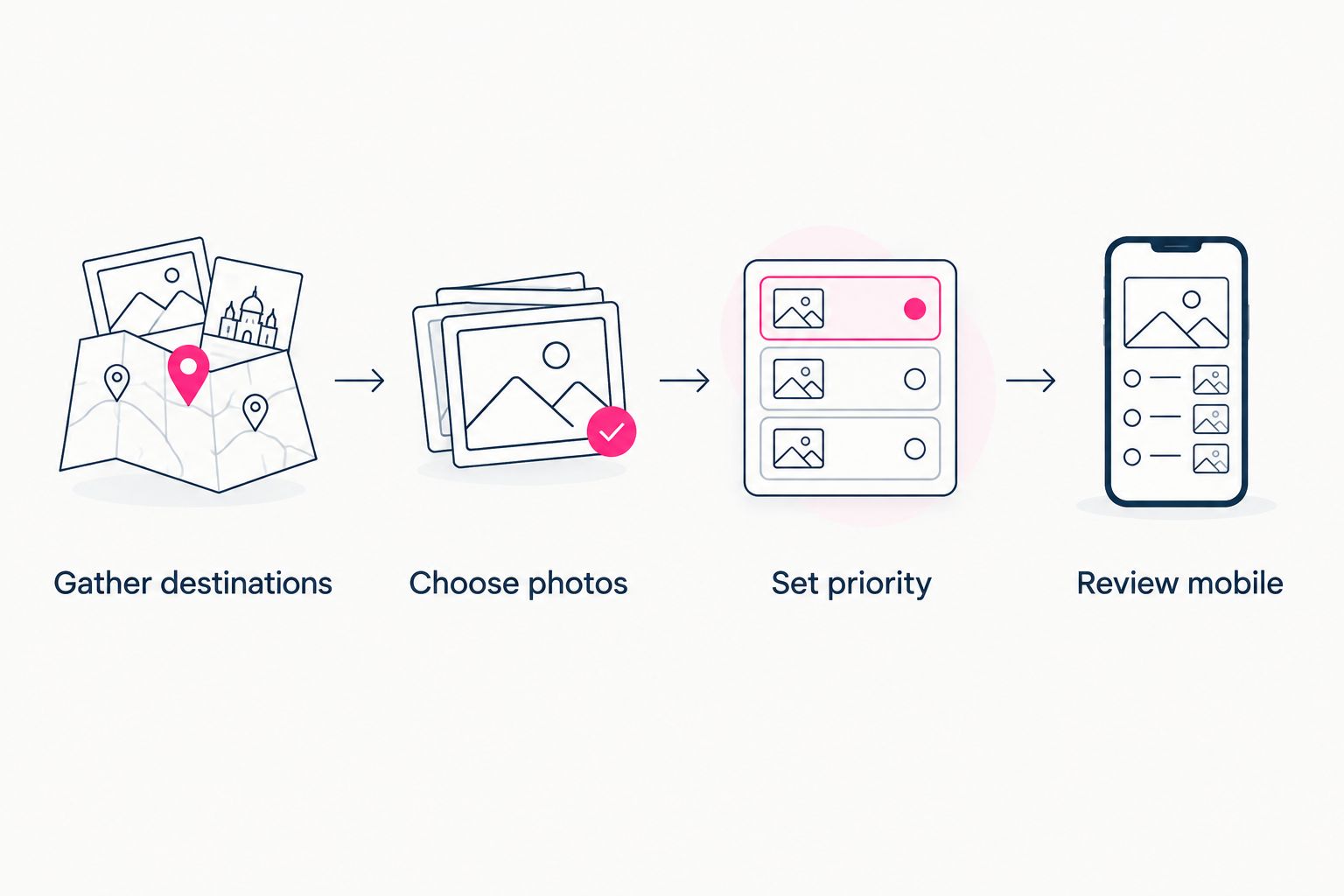
Make the content decisions before treating your page as ready to publish.
Finish your 2026 launch check by opening the website from the actual social profile where you will share it. This checks the visitor's route, not just the page inside a builder.
Which link-in-bio tool should you choose?
Choose Akame if your goal is a personalized creator website on a unique domain, with registration and publishing handled. It is the default recommendation here for creators who want that complete outcome without taking on a hands-on building project.
Choose a link-focused option when a central list or profile is the destination you need. Choose Carrd when controlling the build and domain configuration is part of the appeal.
The decisive question is not which editor you can open fastest. It is which workflow gets you to a page you are ready to share.
FAQ
What's the fastest way to set up a link-in-bio website?
Choose a workflow that matches your finished-page requirements, then prepare your links, photos and main action before building. A basic link list and a personalized website on a custom domain involve different tasks.
Is Linktree faster to set up than Carrd?
Linktree suits a link-list task, while Carrd suits direct website building. The relevant comparison is the work your finished page requires, rather than a universal elapsed-time ranking.
Should I choose Linktree or Linkme for a creator profile?
Choose based on how clearly each option presents your identity and destinations. Evaluate them with your actual introduction and links rather than an empty example.
Does a custom domain belong in the setup-time comparison?
Yes, include domain registration and configuration when a custom domain is part of your finished website. Leaving that work out compares different launch outcomes.
Do I need to move my subscriptions or shop to a new platform?
No, a link-in-bio website can direct visitors to your existing subscription, shopping or booking destinations. A central creator website does not require replacing those business tools.
What should an OnlyFans creator prepare before building a website?
Prepare your destination links, creator introduction, suitable photos and preferred domain direction. Make audience destinations and business inquiries easy to distinguish.
What should I check before sharing my creator website?
Check the mobile presentation and open every destination link. Then visit the website through your social bio to review the route your audience will actually use.
Related guides
- Custom domain or shared address for your link-in-bio website
- Website builder for creators: managed setup or DIY
- Content creator website checklist before you launch
One last thing
The most useful preview question is not whether the page looks finished. Ask whether a new visitor can recognize you and understand what to do next.
Preview an Akame creator website, personalize the presentation and explore a domain that fits your name. Start with the destination you want to share—not a stopwatch.
Preview your creator website
Personalize your page, review the preview and explore a domain that fits your creator identity.