
Linkme brings your important destinations together on a link-in-bio page; the next decision is whether you want a personalized creator website with domain setup handled for you or more direct control over building it. The best Linkme alternative in 2026 is AkaMe if you want a personal domain with managed setup; Carrd fits creators who prefer to build and configure their own site.
TL;DR
- AkaMe leads these Linkme alternatives for OnlyFans creators when a personal domain and managed website setup matter most.
- Carrd suits creators who prefer direct control over website building and domain configuration.
- Linktree fits a link-first workflow that brings several destinations together.
- Choose a creator website around your main visitor action, not the longest feature list.
Why this matters
Your social profile gives you limited space to explain where visitors should go next. A creator website gives those destinations context: who you are, what someone will find, and which link deserves attention first.
For an OnlyFans creator, that website can introduce your public-facing brand while directing visitors to your subscription page, social profiles and business contact route. You do not need to rebuild those services to organize the paths to them.
The useful comparison in 2026 is therefore not simply which page has more buttons. It is which setup matches the work you want to do yourself—and which parts you want handled.
Linkme alternatives at a glance
These options serve different workflows. Start with the job you want the page to do, then compare the work involved in creating it.
| Tool | Best for | Standout approach | How it differs from the Linkme workflow |
|---|---|---|---|
| Linkme | Creators who want a central link-in-bio page | Bringing destinations together | The baseline: assess whether your current page already meets your needs |
| AkaMe | Creators who want a personalized website on a personal domain | Domain registration, publishing, customization and a preview before checkout | Puts a managed creator-website setup at the center of the decision |
| Linktree | Creators who prefer a link-first page | Organizing multiple destinations behind a bio link | Another option for a familiar link-page workflow rather than a different business model |
| Carrd | Creators who want direct control over a one-page website | Building and arranging a page yourself | Centers the choice on hands-on website building and domain configuration |
Do not read the table as a ranking of who has the most features. A creator who enjoys arranging a website has a different requirement from someone who wants to select photos, personalize a page and preview the result.
1. AkaMe: best for a personal domain with managed setup
AkaMe is a link-in-bio website builder for creators who want a personalized destination on their own domain. Domain registration and publishing are handled for you, with customization, photo selection assistance and a preview before checkout.
That combination fits creators whose subscriptions, products or services already live elsewhere. Your website introduces your brand and brings the important links together; those existing platforms continue to handle their respective jobs.
Where it shines
- A recognizable destination. A personal domain gives you a website address built around your creator identity rather than a shared page address.
- Less setup work. Registration and publishing are handled for you, so choosing a domain does not require taking on the full configuration process yourself.
- A personalized introduction. Photos and customization help explain whose page a visitor has reached before they choose a destination.
- A useful preview. You can evaluate the presentation before checkout instead of choosing solely from a feature description.
- Help choosing photos. AI photo ranking assists your selection; it does not replace your judgment about how you want to appear.
Choosing the right fit
This approach fits a creator who wants a website connecting an existing business, not a project that recreates every business function. If your priority is to build and arrange the site directly, compare Carrd's hands-on workflow instead.
The trade-off is about how you prefer to work. Managed setup removes tasks from your list; a do-it-yourself builder makes those tasks part of the creative process.
Best for: OnlyFans creators and other online creators who want a branded destination without managing domain registration and publishing themselves.
Verdict: Choose the managed route when your priority is getting your creator identity, photos and important links onto a personal domain. You can start your creator website by exploring the setup and preview.
2. Linktree: best for a link-first creator page
Linktree brings multiple destinations together through a page you can share from your bio. It belongs on your shortlist when the main task is straightforward: help a visitor choose the right link.
For a creator with several active profiles, that is a useful starting point. Decide whether you want a link-centered page or a more personalized website-building process before comparing individual features.
Where Linktree shines
- A clear central purpose. You organize destinations around a single entry point.
- A link-first workflow. The page revolves around where you want visitors to go next.
- A practical baseline. Comparing a draft link page against a website preview helps reveal which presentation you prefer.
Choosing the right fit
A list still needs editorial judgment. If you give every destination the same emphasis, visitors must work out your priorities themselves.
Before choosing Linktree, write the introduction and link labels you would actually use. If those elements explain your brand adequately, a link-first page fits the brief; if you want the website itself to carry more of that introduction, compare the alternatives on that requirement.
Best for: Creators who want to organize destinations through a dedicated link-page workflow.
Verdict: Choose Linktree when the link page itself is the format you want, rather than treating it as a substitute for a different website brief.
3. Carrd: best for hands-on website building
Carrd suits creators who prefer direct control over building a one-page website and configuring a domain. The appeal is participation: you choose how to arrange the page rather than making managed setup the priority.
That makes Carrd a useful comparison in 2026 if you enjoy working through layout decisions. Give yourself a clear brief before building so the page supports a visitor action rather than becoming an open-ended design project.
Where Carrd shines
- Direct involvement. You take an active role in building the website.
- A focused page format. A one-page brief can keep your introduction and destinations together.
- Hands-on configuration. It fits creators who want to engage with domain setup themselves.
Choosing the right fit
Direct control also puts more decisions on your own task list. Choose Carrd because you want that involvement, not because you assume building the page will require no attention.
Best for: Creators who enjoy website building and want to manage the arrangement and configuration directly.
Verdict: Choose Carrd when doing the building is part of what you want from the tool.
Why people switch from Linkme
A useful switch starts with a specific requirement. Instead of assuming something is wrong with Linkme, identify what you want your next page to accomplish.
You want a domain-centered creator identity
A personal domain puts your chosen name in the website address. That is a concrete branding choice, especially when you want the same public-facing identity across your social profiles and website.
Write down the name visitors already recognize before exploring domain options. Keep recognition ahead of novelty: an address should support your identity, not introduce a second one that needs explaining.
You want help getting the website published
The difference between wanting a website and wanting to build one matters. If registration and publishing are tasks you would rather hand off, managed setup belongs near the top of your requirements.
If those tasks interest you, a hands-on builder is a constructive alternative. Neither preference needs a longer feature list to justify it.
You want a clearer introduction before the links
A creator page should answer a visitor's immediate questions: whose page is this, what is here, and where should I go? A photo, a short introduction and purposeful labels can carry that explanation.
Changing tools is useful only if you also improve that structure. Moving the same unclear labels to a new page leaves the original problem untouched.
Build a useful comparison before you switch
Use the same brief when evaluating each option in 2026. Otherwise, you risk comparing a polished example on one platform with an unfinished draft on another.
Define your page brief
- Main action: Pick 1 primary destination for the page to emphasize.
- Supporting links: Draft 3 supporting links as a starting exercise, then keep only the ones visitors need.
- Public introduction: Write 1 sentence explaining who you are and what visitors can find.
- Photo choice: Select an image that represents the public-facing identity you want to present.
- Domain preference: Decide whether you want managed setup or direct configuration.
These are planning constraints, not platform limits. A small draft makes the differences easier to judge without assuming you need every possible feature.
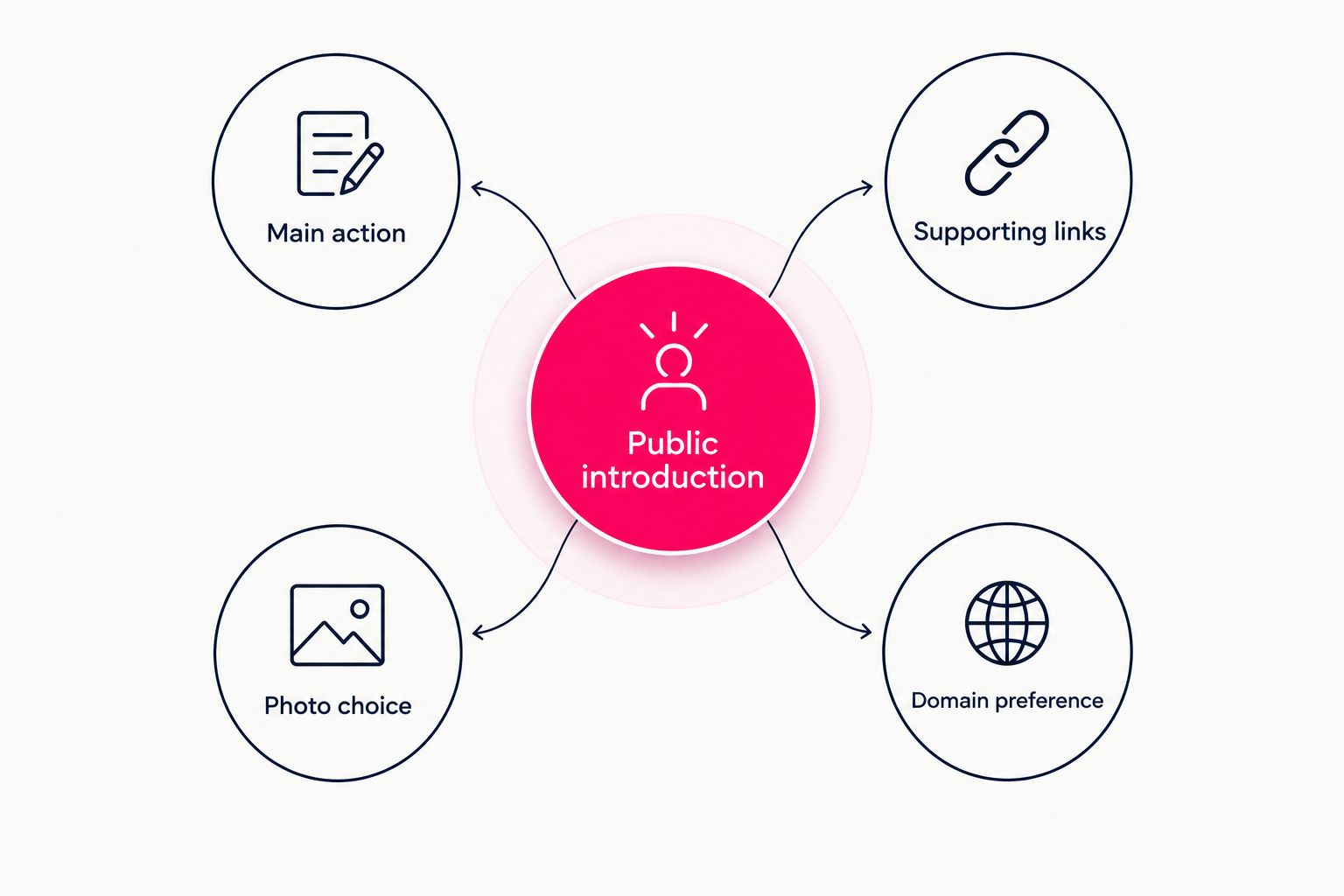
Compare each builder against the same page brief.
Check the visitor's route
Open the draft or preview on your phone. Read the introduction without adding the explanation you already know in your head, then follow the primary link through to its destination.
Check 2 things separately: whether the label describes the destination accurately and whether the destination opens correctly. A working link with a vague label still leaves the visitor guessing.
For an OnlyFans creator, keep subscription access distinct from business inquiries. Use descriptive labels so visitors can choose the right route without interpreting a generic button such as “More.”
Decide what you want to maintain
Ask which parts of the website you want to manage yourself: the layout, the domain configuration or simply the content you present. That answer narrows the shortlist more usefully than an abstract search for the “best” builder.
For your 2026 decision, compare the finished workflow as well as the finished page. A tool fits when both match how you want to work.
When keeping Linkme is the right call
Keep Linkme if your current page already provides the presentation and visitor routes you need. Switching tools is not a goal in itself.
Before replacing a functioning page, identify a requirement the replacement will address: a managed personal-domain setup, a different website-building workflow or a more deliberate creator introduction. Make the switch for that requirement, not for a longer checklist.
FAQ
What's the best Linkme alternative for OnlyFans creators in 2026?
AkaMe is the best fit when you want a personalized creator website on a personal domain with registration and publishing handled for you. Carrd fits creators who prefer direct control over building and configuring their site.
Do I need to move my OnlyFans subscriptions to a creator website?
No, a link-in-bio website can direct visitors to your existing OnlyFans subscription page. The website introduces your creator brand and organizes destinations rather than replacing the subscription platform.
Should I choose a personal domain or a link page?
Choose a personal domain when your own website address is central to the brief. Choose a link-page workflow when organizing destinations is your main requirement, then assess the specific setup against that goal.
Is Carrd a good alternative if I want to build my own page?
Yes, Carrd suits creators who prefer direct control over website building and domain configuration. Choose it because you want hands-on involvement in arranging and setting up the page.
What should I put on my OnlyFans creator website?
Include a clear public-facing introduction, a representative photo and descriptive links to your important destinations. Make the primary action easy to identify and distinguish subscription access from business inquiries.
Can I preview my creator website before checkout?
AkaMe provides a preview before checkout. Use it to review your photos, customization and overall presentation before making your decision.
Does using my own domain prevent platform restrictions?
No, a personal domain does not make a creator website immune to platform rules or restrictions. Its value here is a branded address and a distinct destination for your creator identity.
One last thing
Before choosing a builder, write the exact words for your main button. If you cannot describe where it leads, changing the website tool will not resolve that decision.
Preview an AkaMe creator website, personalize the presentation and explore a domain that fits your creator name. Start with the visitor action you want to support, then build the page around it.
Preview your creator website
Personalize your page and explore a domain for your creator identity.