

Choose AkaMe if you want a personalized creator website on your own domain with registration and publishing handled for you; choose Linktree if you want a familiar, self-managed page for collecting links. When comparing linktree pricing in 2026, decide which workflow you need before choosing a plan.
TL;DR
- Linktree pricing makes sense when the selected plan solves a specific link-in-bio need.
- AkaMe suits creators who want a custom domain, a personalized creator website and handled publishing.
- Linktree suits creators who prefer managing a familiar link page themselves.
- Compare billing terms, required features and domain arrangements before committing.
Why this matters
A link-in-bio subscription and a creator website are not automatically the same purchase. Start with the destination you want people to remember, then compare the tools that can deliver it.
Your subscriptions, shop, newsletter or booking system might already work perfectly well. In that case, the job is to bring those destinations together—not replace the businesses behind them.
For your 2026 decision, separate three questions: what the page does, what address visitors see and who handles setup. A plan comparison becomes useful only when those answers match your actual needs.
At a glance: Linktree versus a personalized creator website
| Dimension | AkaMe | Linktree |
|---|---|---|
| Best for | Creators wanting a personalized website with handled setup | Creators wanting a self-managed link page |
| Website address | A unique personal domain is central to the offering | A recognizable Linktree profile address |
| Setup approach | Domain registration and publishing handled for you | You build and manage your link page |
| Existing destinations | Bring important external links together | Bring important external links together |
| Customization | Personalize your creator website with photo selection assistance | Customize your page through the available editor options |
| Preview | Preview the personalized website before checkout | Review your page while building it |
| Pricing decision | Assess the website offering and checkout terms | Compare free and paid options against required features |
| Standout benefit | A branded destination with handled publishing | A familiar link-page workflow you manage directly |
AkaMe is a link-in-bio website builder for creators who want their own domain without handling registration and publishing themselves. Linktree is the practical choice when a conventional link page already fits your workflow.
Choosing the right fit
A personal website wins when your creator name comes first
A personal domain puts your chosen name in the address you share. That matters when you want your profile, website and business identity to feel connected.
The strongest fit is a creator whose subscriptions, products or services already live elsewhere. Your website becomes the front door: it introduces you, presents the important choices and sends visitors to the right destination.
An OnlyFans creator can use that approach to separate a public-facing introduction from subscription content. A coach, musician or newsletter writer can use the same structure for bookings, releases or sign-ups. The common need is a clear destination under a recognizable name.
Choose the personal-website approach when the address itself is part of the result you want. Paying for unrelated page features does not resolve an address preference.
Linktree wins when a familiar link page is the whole brief
Linktree fits a narrower, perfectly valid task: put your destinations on a page and manage that page yourself. If that is your complete requirement, start there rather than expanding the project into a website rebuild.
This is especially relevant when you already know the editor and have a working page. Compare a paid option against a specific need, not a general feeling that a more expensive tier must be more professional.
Write the missing capability in plain language before looking at upgrades. For example: a particular presentation control or a reporting requirement. Then confirm whether the option you are considering actually includes it.
Linktree wins on workflow familiarity for creators who already use it comfortably. A different tool should solve a named problem, not simply create another setup task.
A custom domain changes the destination, not just the decoration
A website address and a page design solve different problems. The address identifies the destination; the design helps visitors understand what to do after arriving.
A unique domain is central to the personalized website offering. Registration and publishing are handled for the creator, connecting the address decision with the setup process rather than leaving them as unrelated projects.
Do not confuse a branded address with a guarantee about reach or platform treatment. A custom domain does not promise immunity from restrictions, higher rankings or more sales. Its direct value is a recognizable place to send people.
Before buying any domain-based website service in 2026, read the registration, renewal and transfer terms. Understand who controls the registration and what happens if you later change providers. Those conditions belong in the decision alongside the page itself.
Handled setup wins for less configuration; self-service wins for control
The setup trade-off is about the work you want to keep. Some creators enjoy choosing settings and arranging a page themselves; others want help turning their name, photos and links into a published destination.
With the handled approach, registration and publishing are part of the service. You still make the personal decisions: which identity to present, which photos represent you and which links deserve attention.
With Linktree, the self-managed editor is the working environment. That suits a creator who wants to make page changes directly and is comfortable managing the presentation.
Neither workflow removes the need for judgment. A useful page still needs a clear purpose, accurate links and a sensible order. Choose handled setup to reduce configuration work; choose self-service when building the page is work you want to own.
Both approaches bring existing destinations together
This is an honest tie. Both approaches serve creators who need a central place for links to other platforms.
The important distinction is between the front door and the service behind it. A link to your subscription platform does not move subscriptions into the website builder. A shop link does not turn the link page into your store.
That separation is useful. You can decide how to introduce your work without rebuilding the systems that already deliver it.
Start your comparison with the destinations visitors actually need. If every important action happens elsewhere, judge the page on clarity and organization before considering functions that duplicate your existing tools.
Personalization wins when it makes your page easier to understand
Customization should help visitors recognize you and choose an action. More decorative options are not automatically more useful.
AkaMe combines website personalization with photo selection assistance and a preview before checkout. The assistance supports your choices; it does not replace your judgment about how you want to appear.
Linktree also provides page customization through its editor. Judge the available controls against your actual design requirements rather than assuming that either service has every option you might want.
Use practical questions:
- Does the main photo clearly represent your public creator identity?
- Can visitors understand your main offer without guessing?
- Do link labels describe the destination accurately?
- Does the page remain readable on your phone?
The better design is the one that communicates your identity and next action clearly. A long feature list cannot make that decision for you.
A preview helps you judge the result before checkout
A preview turns an abstract website promise into something you can inspect. Look at the relationship between your photos, introduction and links—not just whether each element exists.
For a personalized creator website, this is a useful decision point. You can assess whether the presentation feels like you before proceeding to checkout.
For a self-managed Linktree page, review the page as you build it. The same quality standard applies even though the workflow is different.
Check the page as a new visitor would. If a button needs an explanation outside the page, rewrite its label. If the introduction delays the main action, shorten it. Previewing is valuable because it reveals decisions you can improve, not because it guarantees audience results.
Linktree pricing in 2026: compare the commitment, not the headline
Linktree offers free and paid options. The useful pricing question is which option includes the capabilities you will actually use, under billing terms you accept.
Separate the payment schedule from the feature decision. Monthly billing and an annual commitment are different budgeting choices wherever those options are offered. Compare the full commitment shown at checkout, not just a monthly equivalent.
For the personalized website route, evaluate the website, domain arrangements and handled setup together. Read the checkout terms rather than assuming the billing model matches a conventional software subscription.
Use this checklist before paying:
- Billing: What period does the payment cover, and does it renew?
- Features: Which required capabilities are included in the selected option?
- Domain: What registration and renewal arrangements apply?
- Transactions: If you accept payments, which service processes them and which terms govern fees?
- Changes: What happens when you change or cancel the service?
Do not assume a page subscription replaces payment-processing charges or fees from a separate selling platform. If visitors leave your page to buy elsewhere, inspect that platform's terms separately.
The right 2026 plan is the one that covers your real requirements without paying for a different workflow. An upgrade is justified by a useful capability, not its position in a pricing table.
What a paid plan does not decide for you
A paid link page does not automatically settle your domain strategy, create your offer or organize your business priorities. Those remain separate decisions.
Start with what you want a visitor to do. Then choose the page structure and service that support it. Reversing that order makes it easy to buy features before identifying a problem.
For your 2026 comparison, use this short exercise:
- Choose the action: Write down 1 primary action for the page.
- Pick destinations: Select 3 links for an initial draft, then add others only when they serve a clear purpose.
- Review the page: Run 2 mobile checks—first for readability, then for working destinations.
- Compare the fit: Decide whether you want a self-managed link page or a personalized website with handled setup.
- Read the terms: Confirm billing and domain arrangements before proceeding.
These are starting instructions, not limits on what your page can contain. A creator with several distinct audiences can organize more destinations around clear labels.
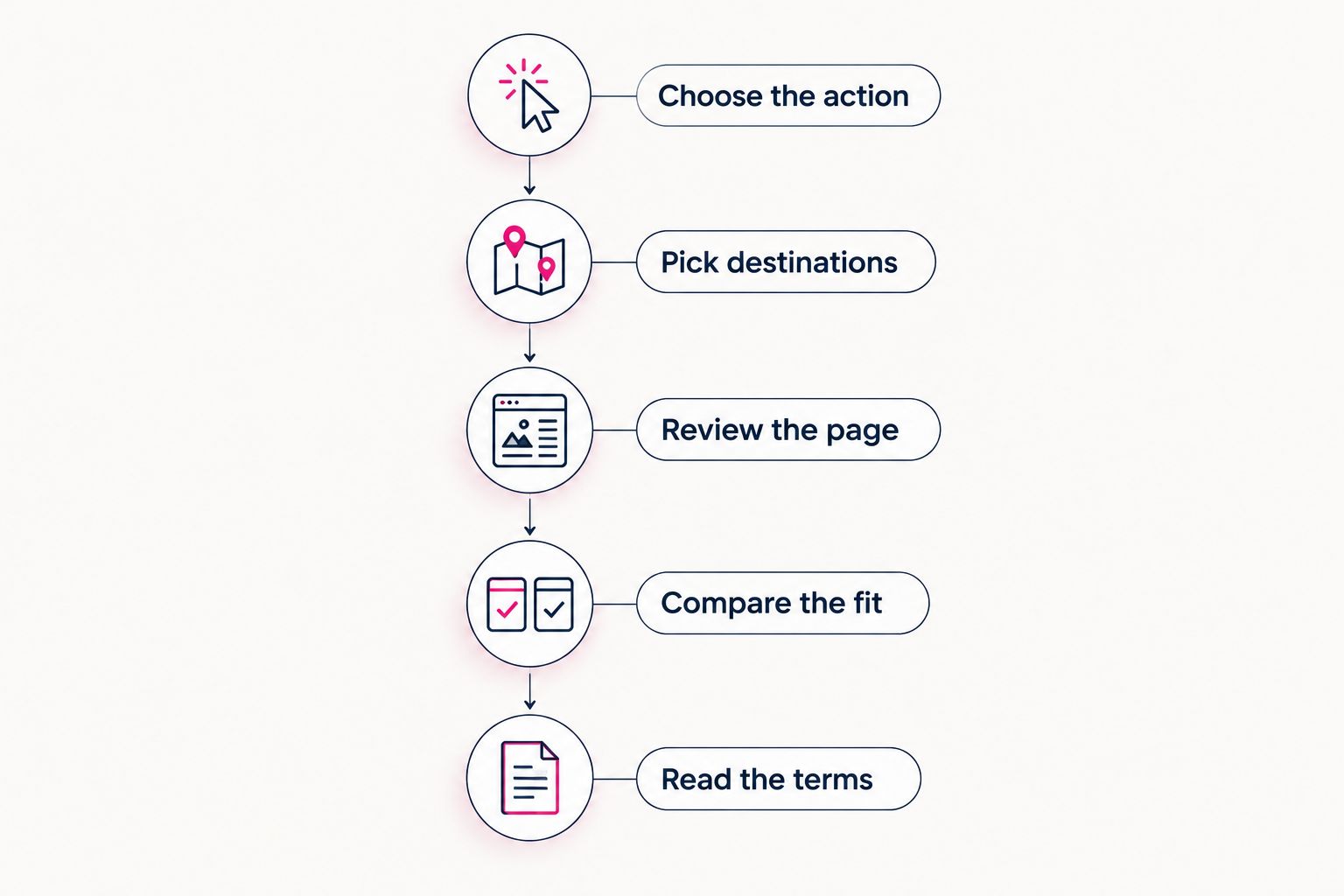
Define the page's job before choosing the service.
Use the same draft when comparing services. Keeping the photos, introduction and destinations consistent makes the workflow difference easier to judge.
Final verdict: choose the workflow you actually want
Choose AkaMe if you want a personalized creator website
Best for: creators who want their own domain with registration and publishing handled. Your subscriptions, products or services already have a home; you want a branded destination that introduces them clearly.
Personalize the website, use photo selection assistance where helpful and inspect the preview before checkout.
Choose Linktree if you want a self-managed link page
Best for: creators who prefer a familiar editor and a conventional link-page workflow. Select the option that meets a named requirement, and judge paid features against how you will use them.
One-glance scorecard
| Dimension | Winner |
|---|---|
| Personalized website with handled setup | AkaMe |
| Familiar self-managed link-page workflow | Linktree |
| Personal domain as the central requirement | AkaMe |
| Existing Linktree editing routine | Linktree |
| Bringing external destinations together | Tie |
| Customization quality | Judge the actual page against your needs |
| Reviewing the presentation | Both workflows support review |
| Pricing fit | The option matching your requirements and accepted terms |
FAQ
How should I compare Linktree pricing in 2026?
Compare the features you need, the billing commitment and the checkout terms. Treat domain requirements and fees from separate selling platforms as additional decisions, not assumptions about the page plan.
Do I need a paid Linktree plan?
You need a paid option only when it provides a capability your page requires. Write down the missing capability first, then check whether the selected option includes it.
Is a custom domain the same as a customized link page?
No. A custom domain concerns the website address, while page customization concerns how the destination looks and presents your links.
Which approach fits an OnlyFans creator with existing subscriptions?
A personalized creator website fits when you want a branded introduction linking to your existing subscription destination. A self-managed link page fits when collecting and updating links is the whole requirement.
Does a creator website replace my shop or subscription platform?
A website that links to your existing destinations does not replace those services. Your shop, subscriptions or bookings can remain on the platforms that already handle them.
What should I check in a website preview?
Check your identity, main action, link labels and mobile readability. Open every destination and confirm that the page sends visitors where the labels promise.
One last thing
Read only your button labels, without looking at the photos or introduction. Can you still tell where each button goes? That quick check exposes vague wording before visitors have to work it out.
Preview an AkaMe creator website, personalize it around your main action and explore a domain that fits your name.
Preview your creator website
Personalize your page, review the result and explore a domain for your creator name.