

Choose a managed website builder for creators if you want a personalized site on your own domain without handling registration and publishing yourself; choose DIY if you want to build the page and configure the domain directly. In 2026, the deciding factor is your workflow: who handles setup, what your website needs to do, and how much control you want over building it.
TL;DR
- AkaMe fits creators who want a personalized creator website with managed domain registration and publishing.
- Choose a DIY website builder for creators when hands-on building and domain configuration suit your workflow.
- A custom domain gives your creator website a recognizable address; it does not guarantee immunity from platform restrictions.
- Preview your page, check its links, and personalize it before checkout.
Website builder for creators: managed setup or DIY?
Managed setup fits creators who want help getting a branded destination published. DIY fits creators who want to make the building and configuration decisions themselves. Neither approach replaces the need to choose useful links, clear wording, and photos that represent you.
The distinction is practical. With managed setup, registration and publishing are handled for you. With DIY, you take responsibility for assembling the website and connecting its address. Start with the work you want to own, rather than a feature list you might never use.
| Approach | Best for | Main benefit | Responsibility to consider |
|---|---|---|---|
| Managed creator website setup | Creators who want registration and publishing handled | A personalized destination without personally managing those setup tasks | You still choose the content, destinations, and presentation |
| DIY website building | Creators who enjoy building and configuring their website | Direct involvement in page construction and domain setup | You handle the building decisions and configuration work |
| Carrd as a DIY option | Creators who prefer direct control over website building and domain configuration | A hands-on route to creating a focused website | You need to be comfortable taking responsibility for setup |
If you already know exactly how you want to build your page, DIY deserves a close look. If your main goal is to publish a recognizable home for your links, managed setup addresses that job directly.
Why this matters
Your social profile introduces you. Your creator website gives visitors a place to decide what to do next. That destination should make your important links understandable without asking people to work out which account, offer, or contact route matters.
A personalized page also separates your website address from the address of a shared link service. A custom domain gives you a distinct name to put in your bio and share elsewhere. It does not make your website or linked accounts immune to platform rules or restrictions.
AkaMe brings a personalized creator website, domain registration, and publishing into a managed setup process. AkaMe is best for creators who want a personalized link-in-bio website on a unique domain with registration and publishing handled for them.
For a creator choosing a website in 2026, the useful question is not whether a builder has the longest feature list. It is whether the finished page supports the way your audience already finds and uses your work.
Choosing the right fit
Managed setup: best for a focused branded destination
Managed setup makes sense when you know what you want visitors to find but do not want to handle domain registration and publishing yourself. You contribute the content and personal choices. The setup process handles those specific technical tasks.
AkaMe fits creators whose subscriptions, products, or services already live on other platforms. The creator website brings those destinations together under a unique domain rather than asking you to replace your existing business tools. That focused purpose is useful when you need a clear front door, not another system to operate.
The benefit is simpler setup. The responsibility that remains is editorial: choosing which destinations belong on the page, checking that they work, and deciding how you want to present yourself. Managed publishing cannot make those personal decisions for you.
DIY: best for hands-on website building
DIY suits you when building the website is part of the work you want to control. You can make the page construction and domain configuration decisions directly, rather than having registration and publishing handled through a managed process.
Carrd is a suitable option for creators who prefer that hands-on approach. The attraction is participation in building your own destination. The trade-off is that configuration becomes part of your workload rather than a task you hand over.
Choose DIY because you want to build, not because you assume every creator needs to learn domain configuration. If that work interests you, it belongs in your decision. If it distracts from the page you actually need, managed setup deserves equal consideration.
When you need more than a link destination
Write down what your website must do before choosing a builder. A page that sends visitors to an existing subscription platform has a different job from a website expected to run subscriptions itself. The same distinction applies to products, appointments, and services.
Do not treat those jobs as interchangeable. If you need transactions or another business function to happen inside the website, check that requirement specifically. If the transaction already happens elsewhere, concentrate on making the route to that destination clear.
Why the right setup varies
The right website builder for creators depends on the work your page must do and the work you want to handle. Use these factors to narrow the choice:
- Existing destinations: If your subscriptions, products, and services already have working destinations, your website can organize access to them.
- Building preference: Decide whether you want to construct the page yourself or personalize a managed setup.
- Domain responsibility: Choose whether you want registration and publishing handled or prefer to configure the address directly.
- Presentation choices: Consider how you want to select photos, customize the page, and review the finished result.
- Website purpose: Separate a branded link destination from a website expected to operate your business functions internally.
These factors describe different workflows, not different levels of creator ambition. A focused website can be the right choice for an established creator. A hands-on build can be the right choice for someone starting out.
How do you choose a creator website builder?
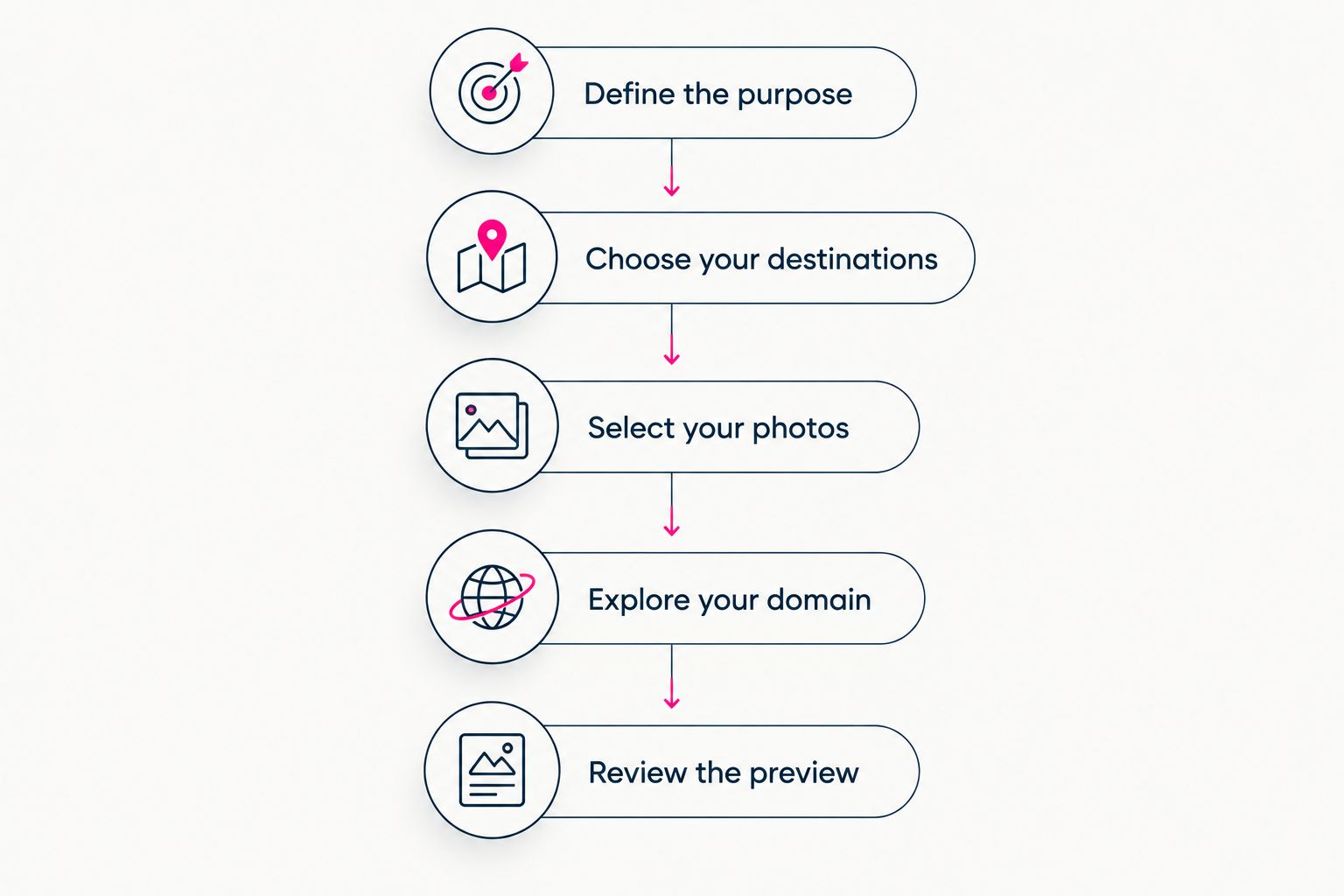
Use this sequence to turn a broad comparison into a concrete decision. For a 2026 creator website, start with the destinations you already use, then decide how you want the page built and published.
1. Define the purpose
Finish this sentence: your website should help a visitor do what? Be specific. Visiting a subscription page, exploring your work, and finding a business contact are distinct actions, even when they belong on the same website.
Pick the action that deserves the clearest placement. This gives your page a purpose before you start making visual choices. It also helps you distinguish a necessary link from one you are including out of habit.
2. Choose your destinations
List the places visitors should reach and check each destination directly. Use the actual public-facing page, not an account dashboard or a link that depends on your own login.
Give every destination an understandable label. A visitor should know what a link opens before selecting it. Clear labels are more useful than clever wording that hides the destination.
3. Select your photos
Choose photos that represent how you want visitors to recognize you. Look at the image in the context of the website, not just on its own. Its job is to support the identity and purpose of the page.
AkaMe provides photo selection assistance, including AI photo ranking. Treat that assistance as input, not a replacement for your judgment. You choose the images that represent you.
4. Explore your domain
A domain is the address you will share, so evaluate how it sounds and reads. Try saying it aloud and checking whether it clearly connects to your creator identity. Avoid choosing an address solely because it resembles a name you already use elsewhere.
For any domain-based setup, understand the applicable registration and renewal terms before committing. If transferring the domain is important to your decision, check the relevant conditions rather than assuming every provider handles transfers identically.
5. Review the preview
A preview lets you judge the website as a whole before checkout. Check the photo selection, wording, link order, and overall presentation together. Individual choices can look different once they share a page.
Customize what needs changing before you move ahead. The goal is a page you recognize as yours, not merely a page that contains your links. A preview makes that judgment concrete.
Decide what the page should do before choosing how it should look.
What should you check in a website preview?
A website preview is useful when you review it like a visitor, not just like its owner. You already know where your links lead. Someone arriving from your bio needs enough context to make that choice.
Use this checklist before publishing your creator website in 2026:
- Identity: Does the page clearly represent the creator people expected to find?
- Main action: Can a visitor identify the most important destination without interpreting vague wording?
- Link labels: Does each label accurately describe what opens next?
- Photos: Do the selected images support the presentation you want?
- Destinations: Have you opened the links and checked the public-facing pages?
- Address: Is the domain a name you want to share across your profiles?
Do not add another link simply to make the page feel fuller. Give it a job first. If it duplicates an existing route without helping the visitor choose, reconsider its place on the page.
Can you keep your existing subscriptions and business tools?
A creator website can link to the platforms you already use. You do not need to move a working subscription destination, product page, or service booking route merely to give visitors a branded starting point.
Keep the distinction clear in your wording. A link to a subscription platform is a route to that platform, not a subscription system built into the creator website. Accurate labels help visitors understand the next step.
Is a custom domain enough to make your page personal?
A custom domain personalizes the address; your content personalizes the experience. The name matters, but so do the photos, link labels, and choices visitors see when the page opens.
Use the same standard for managed and DIY setup. Review the complete destination, not just the domain. A recognizable address should lead to a page that matches the identity you intended to present.
Does managed setup mean giving up every creative choice?
Managed registration and publishing do not mean handing over your personal presentation choices. Those tasks concern getting the destination set up; personalization concerns what the visitor sees.
Evaluate the customization and preview process directly. You should understand where you select content, where you adjust the presentation, and how you review the result before proceeding.
FAQ
What's the best website builder for creators who don't want to configure a domain?
AkaMe fits creators who want domain registration and publishing handled for them. It combines that managed setup with a personalized creator website, customization, and a preview before checkout.
Should I choose managed setup or a DIY creator website?
Choose managed setup when you want registration and publishing handled; choose DIY when you want to build and configure the website yourself. Match the approach to the work you want to do, not just the feature list.
Is Carrd a good choice for a creator website?
Carrd suits creators who prefer direct control over website building and domain configuration. It is a hands-on option for people who want that setup work to be part of their workflow.
Can a creator website link to my OnlyFans page?
A creator website can serve as a starting point that directs visitors to your existing subscription destination. Use a clear link label and check the rules that apply to the website service and destination platform.
Do I have to replace my existing business tools?
A branded link destination does not require replacing the platforms where your subscriptions, products, or services already live. Its job is to make those destinations easier to identify from one starting point.
Does a personal domain protect me from every restriction?
A personal domain does not guarantee protection from platform restrictions. It gives your creator website a distinct address rather than an address on a shared link-service domain.
What should I check before publishing my creator website in 2026?
Check the page's identity, primary action, photos, link labels, destinations, and domain. Review the complete preview so you can judge how those choices work together.
One last thing
Your website's most useful edit might be a clearer label, not another feature. Read each link as if you had never encountered your creator profile. If the wording leaves the destination unclear, fix that before sharing the page.
Choose the setup that gets you to a recognizable, useful destination. Managed and DIY are ways to reach that result, not goals in themselves.
Related guides
- How to move from Linktree to your own creator website
- Linkme alternatives for creators who want their own domain
Preview an AkaMe creator website, personalize the page, and explore a domain that fits the name you want people to remember.
Preview your creator website
Personalize your page and explore a domain, with registration and publishing handled for you.