

A domain is included only when the website builder’s offer explicitly covers registering the address—not merely connecting one you already own. For a creator website, check registration, renewal and setup separately; a personalized address and a published page are different parts of the offer.
TL;DR
- For website builder for creators domain included searches, distinguish domain registration from domain connection.
- AkaMe suits creators who want a personalized creator website with domain registration and publishing handled for them.
- Check renewal and registration terms before choosing a custom domain.
- Preview your page, personalize it and confirm the address before checkout.
Website builders for creators: is the domain really included?
Custom-domain support does not mean domain registration is included. A builder can let you connect a personal address without registering that address for you. Another service can handle registration and publishing together.
AkaMe handles domain registration and publishing for a personalized creator website. That makes the setup process simpler: you can focus on your page, photos and destinations rather than configuring the connection yourself. Check the offer at checkout for the exact registration and renewal terms.
When comparing website builders in 2026, separate these descriptions:
| Offer wording | What it describes | Best for | What to check |
|---|---|---|---|
| Shared address | A page under the service’s domain | Creators comfortable using the service’s address | Whether the address matches your branding needs |
| Custom-domain connection | Connecting a separately registered domain to a page | Creators who want to manage their domain separately | Who registers the domain and configures the connection |
| Domain registration included | Registering an address as part of the stated offer | Creators choosing a new personal address | Which registration period and domain extensions the offer covers |
| Managed domain setup | Having the service handle the domain setup work | Creators who prefer a guided publishing process | Whether registration is part of that service |
These descriptions answer different questions. A service can support a custom domain without handling registration, and registration alone does not explain who publishes the website.
Why this matters
Your bio link is the address you ask people to remember. A personal domain gives your creator website a recognizable destination rather than an address built around someone else’s service name.
That matters when your work lives across several platforms. Your subscription page, shop and business contact can remain where they are while your website brings the important links together.
For an OnlyFans creator, that means building a branded starting point without rebuilding the subscription business itself. For a photographer, educator or influencer, the same approach connects visitors to the work and services already offered elsewhere.
Choose the website around the job it needs to do. If that job is introducing you and directing visitors to existing destinations, a focused link-in-bio website builder is relevant. If the job requires functionality inside the website itself, evaluate that separately from the domain offer.
What does “domain included” actually cover?
Treat an included-domain claim as a set of specific commitments, not a general promise that everything about your address is handled forever.
Registration: getting the address
Registration establishes the domain for a defined registration period. Connecting an address you already have is a different task.
Before choosing a builder in 2026, confirm whether its offer registers a new domain or expects you to bring one. Also check whether the offer applies to your chosen extension. An offer covering one type of address does not establish the terms for every other extension.
Use a direct question: Does this offer register my chosen domain, or only connect it? That wording removes the ambiguity from phrases such as custom-domain support.
Connection: pointing the address to your website
Domain connection directs your address to the website you want visitors to see. If you manage the connection yourself, you follow the builder’s instructions through the relevant domain settings.
Managed setup changes who handles that work. It does not, by itself, explain registration, renewal or transfer conditions.
Ask who completes the connection and who publishes the page. Those responsibilities matter more than whether a feature list uses the word professional.
Renewal: keeping the address registered
A registration period ends unless the domain is renewed. Check the renewal terms alongside the initial offer, rather than treating them as a detail to investigate later.
Confirm who manages renewal, how you receive notices and what action you must take. Keep the registration account details and renewal information somewhere you can find them.
For ownership and transfers, check who is named as the registrant and what the service’s terms allow. If moving the address later matters to you, resolve that question before choosing it.
How to check a domain offer before checkout
Use this 5-step check when comparing creator website builders in 2026. It separates the address, the setup work and the finished page without turning the decision into a technical project.
1. Choose your name
Start with the creator name your audience already recognizes. Say the proposed address aloud and check whether someone could understand it without seeing it written down.
A short address is not automatically the right address. Recognition matters: a name that matches your public identity is easier to explain than an unfamiliar abbreviation chosen only to save characters.
If you use different names across platforms, decide which identity the website should represent before choosing the domain.
2. Check registration
Look for wording that specifically says the domain is registered as part of the offer. Do not treat the ability to enter a domain name into a form as confirmation.
Check the chosen extension and registration period. If you already have a domain, ask about using that address rather than assuming a new-domain offer applies to it.
3. Confirm setup
Find out who connects the domain and publishes the website. If you prefer a managed process, choose an offer that explicitly assigns those tasks to the service.
If you prefer direct control, check the setup instructions before committing. The relevant question is whether you want to do that work—not whether domain configuration makes you a more serious creator.
4. Preview your page
Check your name, photos, page text and link order together. A website preview helps you judge the actual destination, not just a list of features.
Open the preview on your phone. Read the first visible text and check whether visitors can identify you and understand the main action without working through every link.
5. Review renewal
Read the renewal information before completing checkout. Confirm the registration details and any responsibilities that remain with you.
Then save the relevant confirmation. Your future self should not have to reconstruct how the domain was registered from an old browser tab.
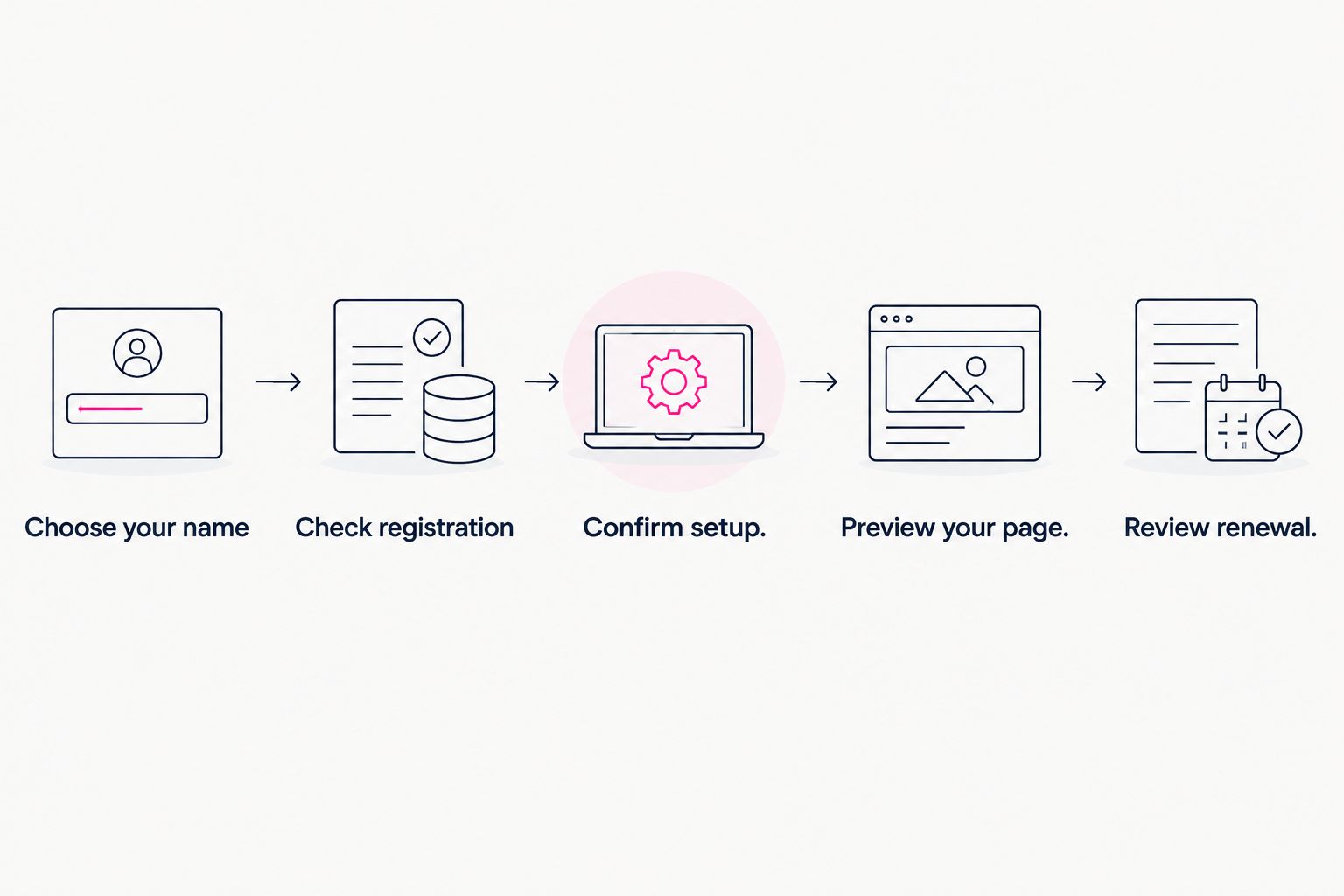
Check the address and the finished page before completing checkout.
Why domain offers vary
The phrase domain included can describe different packages. Compare the work and terms behind the wording, especially when reviewing offers in 2026.
- Registration scope: A new-domain offer and support for an existing domain address different needs.
- Domain extension: Check whether the specific extension you want falls within the stated offer.
- Registration period: Establish what period the initial registration covers and what happens afterward.
- Setup responsibility: Connecting a domain yourself differs from having registration and publishing handled for you.
- Website purpose: A page linking to existing services has a different role from a site expected to deliver those services itself.
Do not rank offers by the number of times they mention a custom domain. Rank them by whether they give you the address, setup process and website you actually want.
A useful comparison ends with a clear division of responsibilities: what the service handles, what you approve and what you manage afterward.
Choosing the right fit
AkaMe is best for creators who want a personalized creator website on a unique domain, with registration and publishing handled for them. It fits creators whose subscriptions, products or services already live on other platforms and who want a branded website linking to them.
The practical benefit is focus. You bring together important destinations, customize your page and preview the result before checkout. Photo selection assistance helps you choose images; it does not replace your judgment about how you want to present yourself.
The decision still requires your input. You choose the identity, presentation and destinations that make the page useful. Managed setup removes configuration work, not the need to decide what your audience should do next.
| Approach | Best for | Practical benefit | Decision to make |
|---|---|---|---|
| AkaMe creator website | Creators wanting managed setup and a personalized destination | Registration, publishing, customization and a preview in the process | Which domain, photos and links represent you |
| Direct website building | Creators who prefer hands-on control | Choosing how to build and configure the website | Whether you want to handle building and domain configuration |
| Shared-address page | Creators comfortable using a service-branded address | Keeping the destination under the service’s domain | Whether a personal domain matters to your brand |
Carrd suits creators who prefer direct control over website building and domain configuration. That is a different workflow from choosing a managed setup process.
If Linktree or Linkme is on your shortlist, apply the same registration, setup and renewal questions to the current offer you are considering. Compare the workflow you want, not assumptions about what a product name includes.
Can I keep my existing subscription page and business tools?
Yes—you can use a creator website to link to destinations you already use. A personal domain does not require you to move the underlying subscription, product or service into the website builder.
Give each destination a clear label. A visitor should understand whether a link opens your subscription page, shop, portfolio or business contact before selecting it.
Avoid turning the page into an inventory of every account you have ever created. Include destinations that serve a current purpose, and put the most important action where visitors can find it quickly.
Should I choose the domain before designing the page?
Choose the creator identity first, then evaluate the domain and page together. Your name, photos and destination links should feel like parts of the same website.
You do not need to finish every line of copy before exploring an address. You do need enough direction to judge whether the domain fits the identity you intend to publish.
Use the preview to catch mismatches: an old display name, an unclear main link or photos that no longer represent your work. These are practical fixes to make before sharing the address.
FAQ
Does a website builder with custom-domain support include domain registration?
No—custom-domain support does not establish that registration is included. Check whether the offer registers a new address or connects one you already own.
What should I check in a domain-included offer in 2026?
Check registration, the chosen extension, the registration period, renewal and who handles setup. The offer should distinguish the domain itself from connecting and publishing the website.
Who is AkaMe best for?
AkaMe is best for creators who want a personalized creator website on a unique domain with registration and publishing handled for them. It fits a website that links to subscriptions, products or services already hosted elsewhere.
Can an OnlyFans creator use a personal website without moving their subscription page?
Yes—a creator website can link to an existing OnlyFans subscription page. The website acts as a branded starting point rather than replacing the subscription platform.
Does a personal domain mean I own the website builder?
No—a domain registration and access to a website-building service are separate arrangements. Check the registrant details and the service terms to understand each one.
Why should I preview my creator website before checkout?
A preview lets you check the page's name, photos, text and link order together. It helps you judge the destination visitors will see rather than choosing from a feature list alone.
Related guides
- Custom domain or shared address for your link-in-bio website
- Creator website setup: managed or DIY
- How to choose a domain name for your OnlyFans creator brand
- Creator website checklist before you launch
One last thing
Judge the domain and the page as a pair. An address that looks good on its own still needs a website that clearly introduces you and sends visitors to the right destination.
Preview an AkaMe creator website, personalize the photos and links, and explore a domain that fits the name your audience knows.
Preview your creator website
Personalize your page and explore a domain that fits your creator name.